Writing in the age of AI
1A clear idea
A clear idea deserves a clear page. Bring your draft, develop your argument, and make the document your own.
Add figures, cite your sources, and review with coauthors.
MoonlitFlow · AI-assisted LaTeX writing
A writing workspace for research papers, theses, and books. Bring a Word draft, write visually or in LaTeX, and let AI help with the technical steps.
Live Preview updates the typeset document as you write. Read the page beside your text, refine a paragraph, and keep writing. Free on every plan.
Start with your ideas, work with AI planning, AI suggesting, AI drafting, AI Figure/Table/Equation, AI polishing, AI translation, AI critique and reviewing, AI latex error fixing ...
A clear idea deserves a clear page. Bring your draft, develop your argument, and make the document your own.
Add figures, cite your sources, and review with coauthors.
Turn research notes into a draft, find sources for specific claims, and prepare your manuscript for submission from the same project.
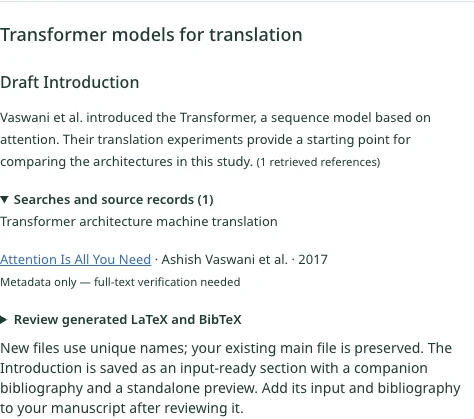
Review a draft introduction on Transformer models and open the source records behind it.
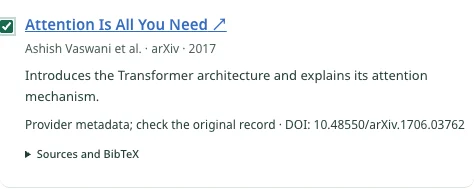
Select a sentence about attention and review the suggested paper and its source record before inserting the citation.
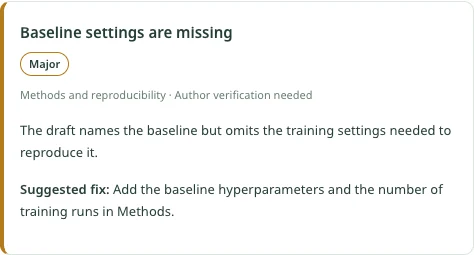
Review a major finding about missing baseline settings and see what to add to the Methods section.
Screenshots from the MoonlitFlow editor with sample results.
Ask questions about your project, revise passages, and work through LaTeX tasks in the editor.
Turn your topic, experiments, and results into an outline or a first draft.
Find related work and draft an introduction with citations you can review.
Find related papers based on the manuscript as a whole.
Select a claim and find papers that may support it.
See where recommended references could fit in the text.
Review suggested corrections and rewrites for selected text.
Refine the abstract using the manuscript as context.
Review proposed layout or wording changes to help meet a target page count.
Get manuscript issues ranked by severity, or check a proposal against the supplied NSF checklist.
Find potential journals based on the manuscript’s topic and scope.
Understand compiler errors and review proposed fixes to the source.
Fit a DOCX, PDF, or Markdown draft to a LaTeX template, or adapt an existing project to another template.
Convert a sketch or screenshot into editable LaTeX math.
Generate tables from your data and TikZ diagrams from a description.
Use the article drafting tool to turn your topic, experiments, and results into an outline. Research literature, draft an introduction with citations, or ask for references for the sentence you are writing.
Keep refining the outline and manuscript in the project. Read the recommended sources and check that they support your claims.
Explore literature workflowsChoose a journal, thesis, or proposal template. Import DOCX, PDF, or Markdown, then let AI extract the structure and fit the content, figures, and tables to the project’s main LaTeX document.
Export Google Docs as DOCX first. Review the extraction and LaTeX before applying it, then compare the compiled document with your original.
See the import steps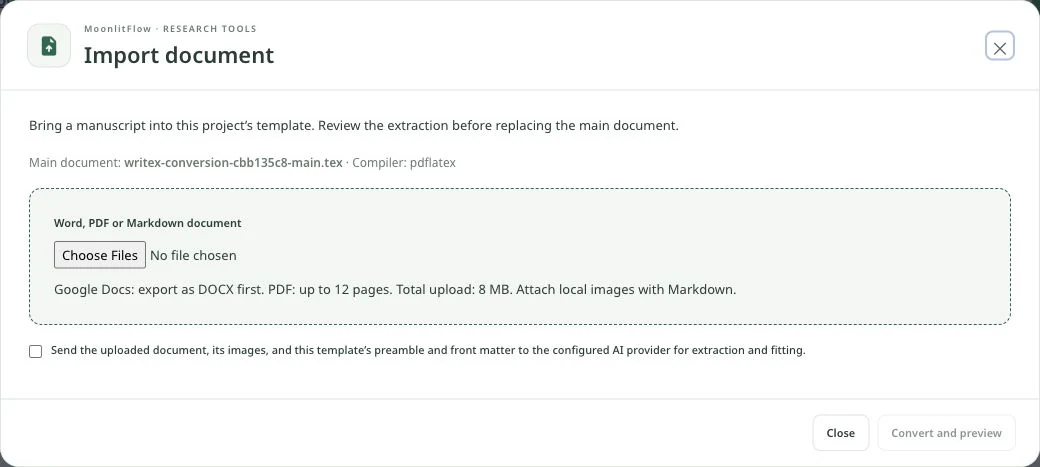
Open a .tex file and switch to Wordex to edit it like a word-processing document. Work with headings, lists, tables, figures, equations, and citations on the formatted page. Your edits are saved to the LaTeX source, so you can switch back to Code in the same project.
Included with Student, Basic, and Pro. New users can try Wordex for one month from sign-up.
Compare plans
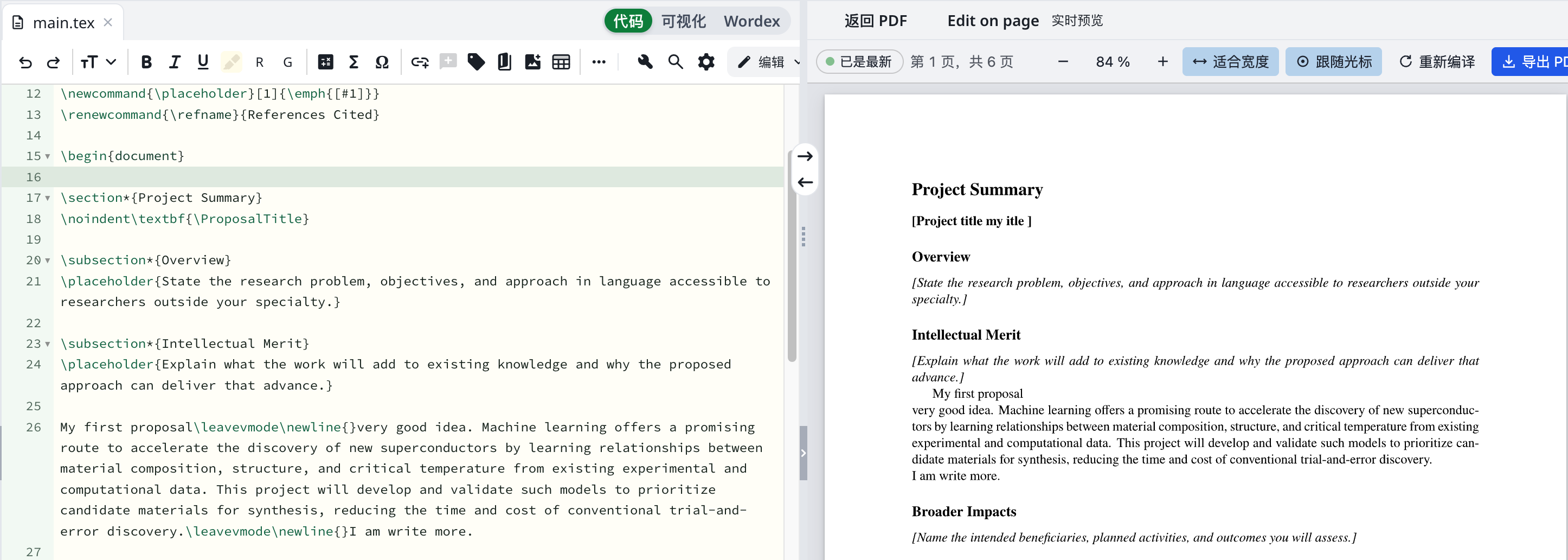
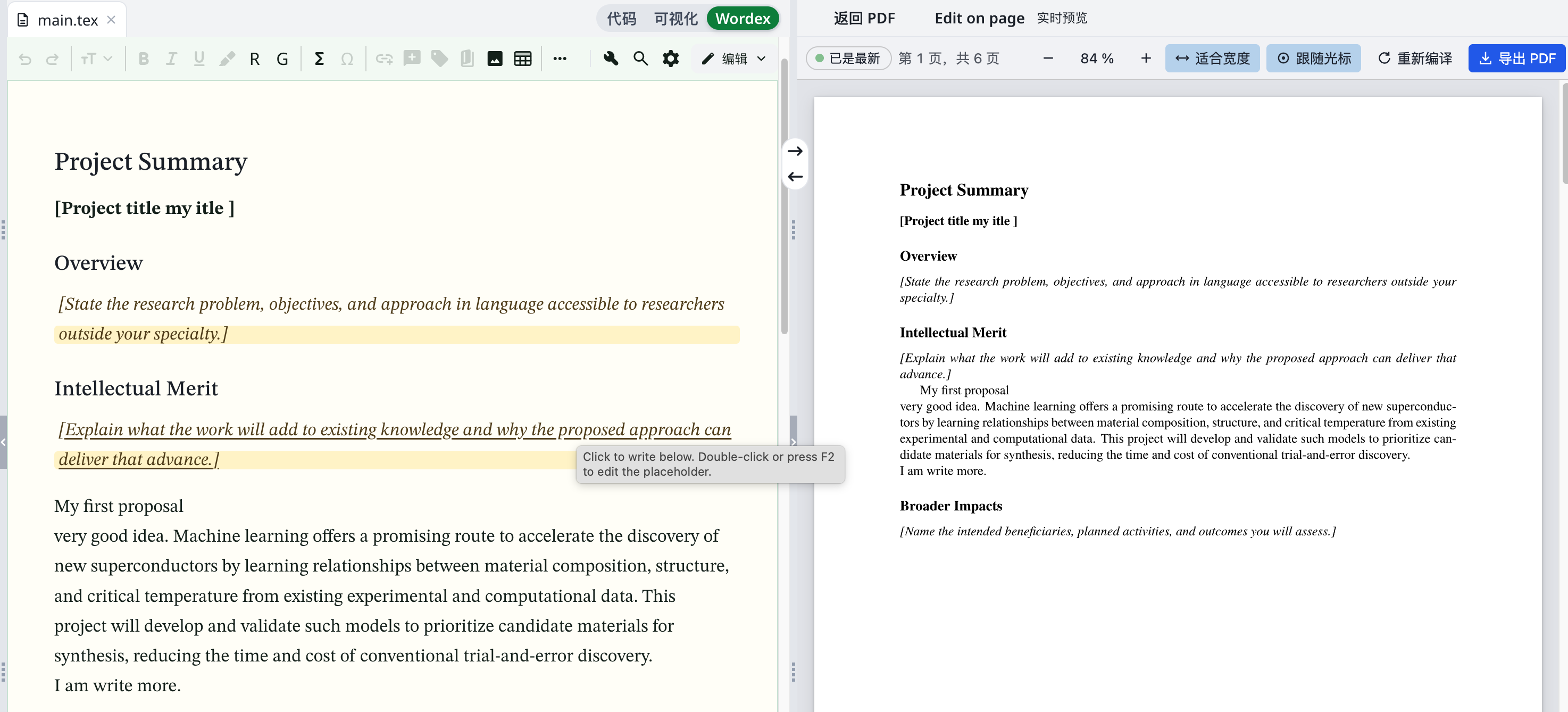
In Live Preview, select Edit on page, then click a supported passage in the rendered manuscript to revise it. MoonlitFlow writes the change back to the corresponding LaTeX source and refreshes the preview.
Liveview editing is included with Pro and available to new users for one month from sign-up. Live Preview itself is free on every plan.
Compare plansChoose a coordinated light or dark palette for the editor background, text, and selection highlights. Open Settings → Appearance → Advanced to preview a palette and apply it to your writing workspace.
Included with Student, Basic, and Pro. New users can try advanced color schemes for one month from sign-up.
Compare plansClick the wrench to ask AI to diagnose LaTeX issues and suggest a fix. Work in Visual or Code, use equation and table tools, and spend more of your writing session on the content.
Inspect the suggested changes and recompile to confirm the result. Complex package or template conflicts can still need further attention.
Learn the editor toolsExample: a missing closing brace
\section{IntroductionIllustrative example. This button does not call AI or edit a project.
Write with a mouse or pen in Draw, or bring a screenshot or equation image. Use the drawing, convert it with AI, and check the recognized LaTeX beside its rendered equation before inserting.
Check subscripts, superscripts, fractions, and symbols against the original. The example below illustrates the input and preview; displaying it does not call AI.
Learn equation editing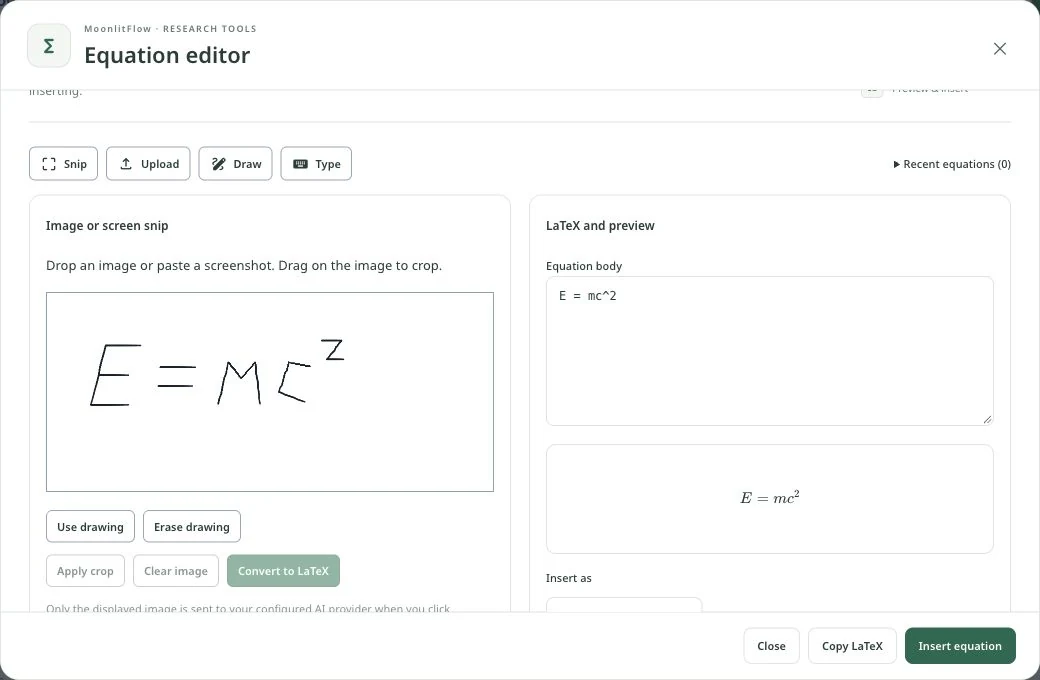
E = mc^2Drop a table image or paste a screenshot into the table editor. Convert it with AI, review the recognized cells and caption in the editable grid, then insert the LaTeX table into your manuscript.
Check words, numbers and merged cells before inserting. You can also import CSV or Excel, format cells, or ask AI to build a table from your supplied data.
Explore table and editor tools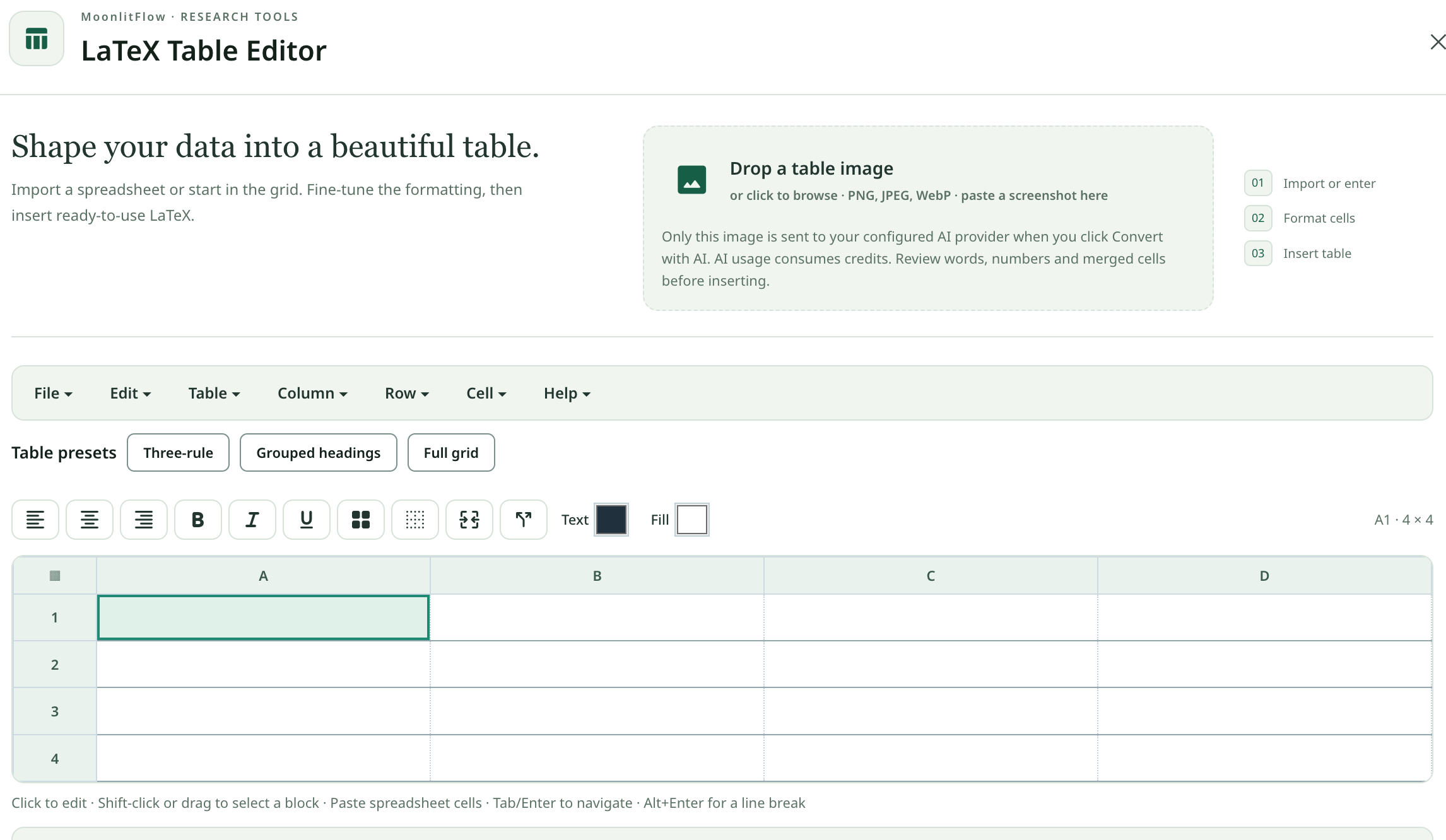
Create a three-line booktabs table with columns Task, Owner, Status. Rows: Literature search / Author / Organized; Method review / Coauthor / To review. Add a caption and label.
| Task | Owner | Status |
|---|---|---|
| Literature search | Author | Organized |
| Method review | Coauthor | To review |
\begin{table}[htbp]
\centering
\caption{Writing checklist}
\label{tab:writing-checklist}
\begin{tabular}{lll}
\toprule
Task & Owner & Status \\
\midrule
Literature search & Author & Organized \\
Method review & Coauthor & To review \\
\bottomrule
\end{tabular}
\end{table}
Illustrative output, not a live AI response. Requires the booktabs package.
Share the manuscript project with coauthors. Discuss ideas in project chat, select a passage to highlight and comment, and use Reviewing mode to propose edits for acceptance or rejection.
Keep discussion attached to the manuscript instead of moving between separate draft copies. Use document history to revisit the writing as it develops.
Explore collaborative writingIllustrative review conversation
The results suggest improved performance under these conditions.
Choose File → Download → Download for arXiv. MoonlitFlow compiles and prepares a ZIP, removes comments, merges included TeX, and packages the required figures, references, and local styles.
Original project files are preserved. Review the exported sources and final PDF for the journal or arXiv requirements before uploading. Quality, grammar, abstract, and page-limit tools help with the preceding checks.
Explore submission workflowsExample ZIP contents
main_clean.texMerged, comment-free manuscriptreferences.bbl / .bibRequired bibliography sourcesfigures/Referenced figuresstyles/Required local classes and stylesFile names and included dependencies depend on your project. This diagram is an example, not an actual download.
AI chat is useful for a question or a first draft. Iterative writing also needs a stable document, selected edits, a visible page, and a place for coauthors to work. MoonlitFlow keeps that cycle in one project: write, see, discuss, revise.
Word editors make prose editing familiar. Traditional LaTeX gives authors precise typesetting. AI chat helps explore an idea. MoonlitFlow brings AI assistance into the manuscript itself.
| Writing task | Word-style editing | Standard LaTeX workflow | ChatGPT-style chat | MoonlitFlow |
|---|---|---|---|---|
| See the final format | Edit the document visually; adjust styles and layout. | Edit source and compile to inspect the output. | Read the response, then move it into a document editor. | Write beside an updating typeset preview, in the project. |
| Use a publishing template | Apply document styles or transfer the draft to LaTeX. | Adapt source, commands, and front matter to the template. | Request markup, then assemble and compile it elsewhere. | Import the draft into a chosen template with AI assistance. |
| Research and cite | Use research sources and citation-manager integrations. | Manage bibliography files and citation keys. | Ask about sources, then verify and organize them in the manuscript. | Research literature and recommend citations in the writing workflow. |
| Revise with coauthors | Use comments and coediting where available. | Use a shared editor or source-control workflow. | Chat threads focus on responses; shared manuscript editing needs another workflow. | Share the manuscript project, comment, review, and iterate in place. |
| Resolve LaTeX issues | Usually outside the word-processing workflow. | Read compiler messages and debug the source. | Paste the error and code, then transfer the proposed fix back. | Ask AI to diagnose and suggest a fix from the editor’s wrench. |
Live Preview is free on every plan. AI tools require AI access and available credits. Review AI suggestions before applying them.
Please specify which conditions were tested.